Establishing the problem
The training consisted of a custom skill track delivered through a third-party learning platform. New hires were assigned the track during onboarding, but managers believed that many were beginning their regular responsibilities without completing it. I first examined whether the available records supported that concern.
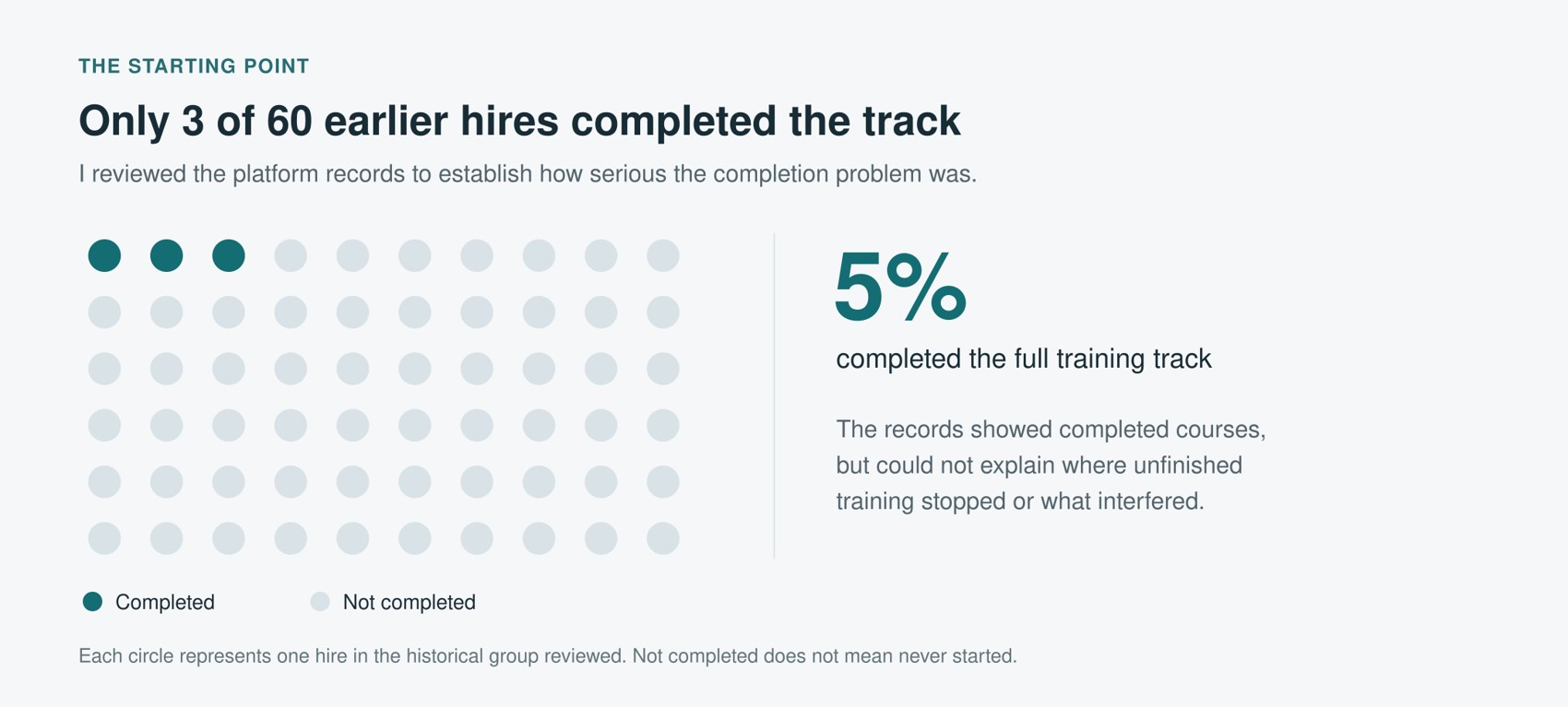
Of the sixty earlier hires assigned the track, three had completed it. Although the platform recorded course completions, it did not provide a usable history of participation in unfinished courses. The records therefore established a low completion rate but could not distinguish employees who had never begun from those who had stopped partway through. They also provided no explanation for either pattern.
Thirteen new hires were about to begin onboarding. Following this cohort would allow us to examine participation over time and investigate interruptions while the employees were still completing their training.
Recording participation over time
I developed an Airtable reporting database and a procedure for logging training sessions. Airtable allowed me to establish the system quickly, connect an HTML form, and make the records available to those responsible for onboarding.
Each employee had a learner record linked to their assigned courses and completion records. Employees used the form to record the date, course, and time spent on each training session. These entries supplemented the platform’s completion records with a history of reported activity. Linking course assignments to individual employees also allowed completion to be calculated against each person’s requirements.
I reviewed the records weekly. Because employees began on different dates, I compared participation by week of onboarding rather than by calendar date. The reports identified outstanding courses and the most recent logged session, indicating where further inquiry might be warranted.
The activity logs were self-reported and required interpretation. An employee could participate without completing a course or finish a course without submitting a log. I therefore checked missing entries against platform completion records and followed up before interpreting an absence of logs as an interruption in training.
Investigating interruptions in training
Some employees submitted no training logs at the beginning of onboarding. Managers contacted them to establish whether they understood that the track was required and knew when they were expected to complete it. I also asked the onboarding coordinator and managers how they had communicated the requirement, then compared their accounts with the onboarding message and the platform’s automated enrollment email. Communication had varied: some employees received a direct explanation, while others received only the automated email. Enrollment in the platform had not consistently established an understanding of the requirement.
Most employees began the training, but recorded participation declined around the fifth and sixth weeks of onboarding. I checked whether this pattern resulted from missing logs. Although some sessions had gone unrecorded, most of the gaps we investigated corresponded to little or no training activity.
To understand the timing of the decline, I asked employees about changes in their schedules and when they had intended to train. I asked managers when project assignments and recurring meetings had begun and whether these responsibilities had displaced training. Project work was increasing during the same period in which participation declined. Several employees also reported waiting for a substantial uninterrupted period to train, only to find that other commitments occupied the available time.
These accounts suggested two areas for intervention: clearer communication of the training requirement and explicit provision for training within employees’ schedules. The activity records helped identify when participation appeared to have stopped. Conversations with employees and managers provided information about the circumstances behind those interruptions.
Revising the onboarding process
Managers reserved recurring training time on employees’ calendars and introduced regular progress discussions. These meetings addressed outstanding courses and established when training would continue. They also provided an opportunity to clarify the requirement where an employee had not understood it.
I supported this process with a dashboard for managers and automated notifications. If an employee had not submitted a first training log by the end of their third workday, Airtable notified the employee and their manager. After the first entry, five workdays without a further log triggered an inactivity notification.
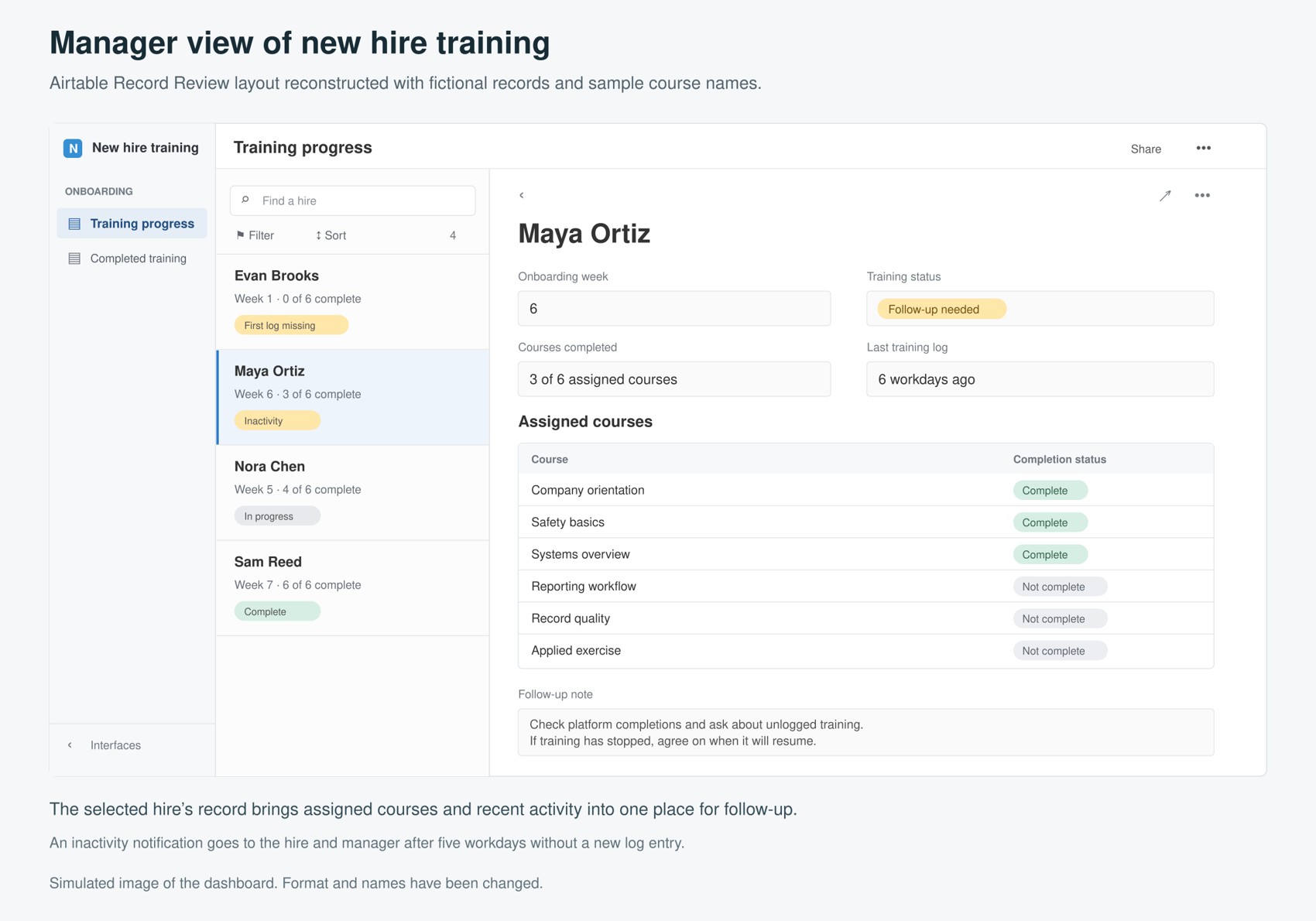
The employee’s notification included a link to the logging form and a request to record any training already completed or resume the track. The manager’s notification identified the last recorded session and the outstanding courses. A new entry reset the inactivity count, preventing repeated notifications about the same uninterrupted gap.
These notifications indicated a need for inquiry. They did not establish why an entry was missing. Managers still needed to determine whether the employee had omitted a log, lacked time to train, or needed assistance getting started. The reporting system supported those conversations without resolving questions that the records alone could not answer.
Results and limitations
Twelve of the thirteen employees in the cohort followed during onboarding completed the full training track.
| Group | Completed the full track | Completion rate |
|---|---|---|
| Earlier hires reviewed | 3 of 60 | 5% |
| Cohort followed during onboarding | 12 of 13 | 92% |
The completion rate was substantially higher in the subsequent cohort. However, the groups differed, the subsequent cohort was small, and several aspects of onboarding changed together. The comparison therefore does not establish the causal effect of the revised process or the contribution of any individual change.
The records establish the completion outcomes for the two groups. The project also produced a means of examining participation during onboarding and investigating interruptions before the training period ended. Completion was the outcome measured; these results do not establish whether employees retained the material or applied it effectively in their work.
Reflection
The historical completion rate identified a problem but provided insufficient evidence to explain it. Following participation over time made further investigation possible, while conversations with employees and managers helped distinguish gaps in recording from difficulties with communication and scheduling. The resulting changes addressed the circumstances in which employees were expected to complete the training.
My role included developing the reporting system, interpreting its records, and helping managers investigate apparent interruptions. The value of the system depended on this combination. Activity data could identify a question requiring attention, but understanding the question required additional evidence. This project reinforced the importance of treating measurement as part of an inquiry into performance rather than assuming that a low completion figure supplies its own explanation.