Understanding the inventory work
The organization used an enterprise resource planning system (ERP) to record how much inventory was held at each location. Employees reported inventory counts and transfers by email, either attaching a scanned form or typing the quantities into the message. A separate employee used that information to update the ERP. If a count differed from the recorded balance, an adjustment was needed; a transfer required recording both the quantity leaving one location and its arrival at the other.
One of the managers contacted me after noticing that inventory discrepancies sometimes remained after adjustments had been entered and that some items had been adjusted repeatedly within short periods. They asked me to investigate what was happening and determine whether training could help.
Investigating the discrepancies
I queried the ERP using SQL to retrieve adjustment records, including the item, quantity, location, entry date, employee, and available document references. I checked entries against the original emails and scanned forms to establish the extent of the discrepancies and identify cases for closer investigation.
To understand how employees handled these requests, I conducted a gemba, observing the work from receipt of the communication through entry in the ERP. I documented the existing workflow and wrote a standard operating procedure (SOP), which employees and their managers reviewed and signed off on for accuracy.
Identifying the training needs
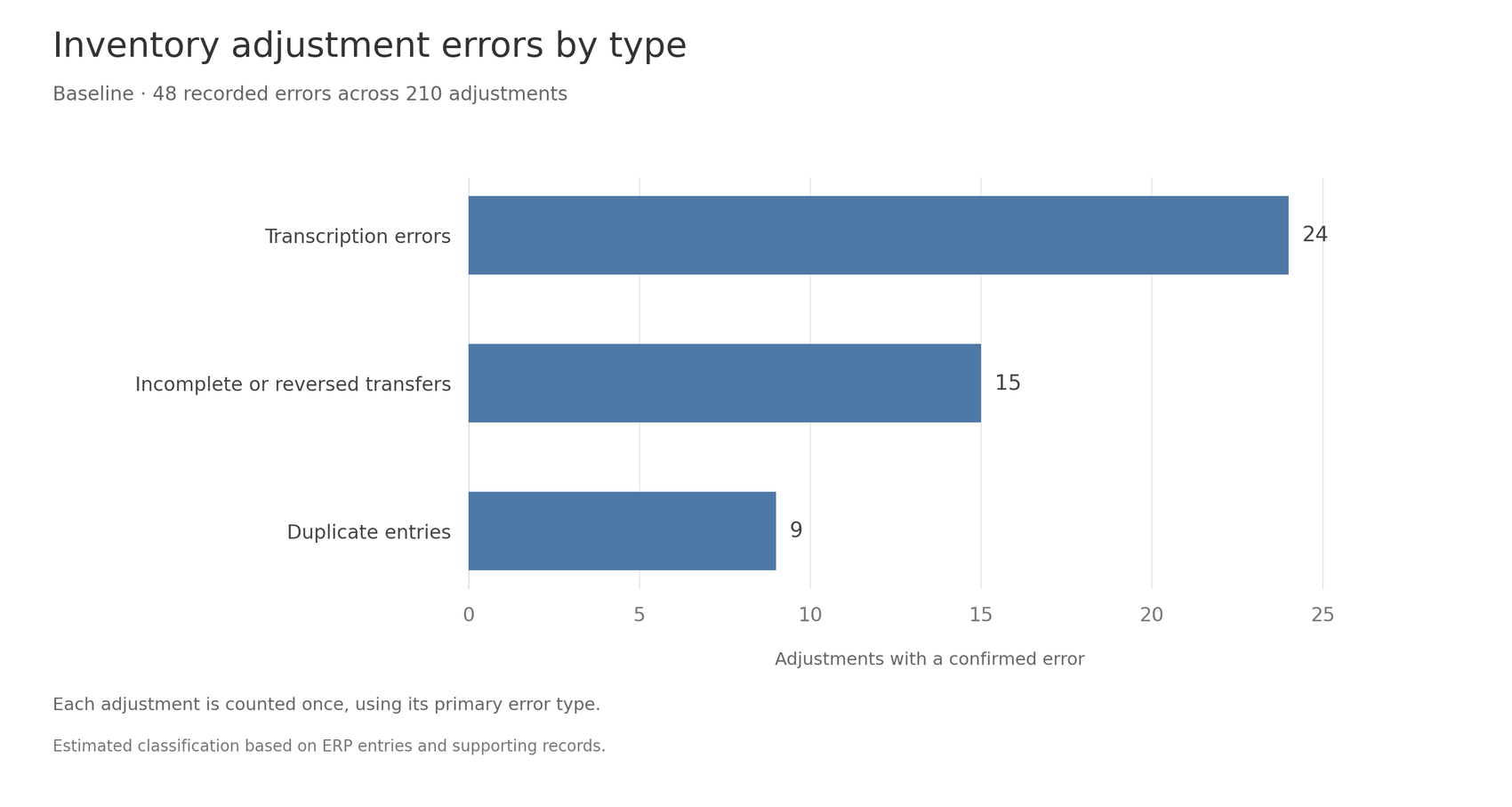
With the documented procedure in place, I observed how employees performed each step and asked them to explain their decisions. They generally knew how to navigate the ERP and enter an adjustment. Reviewing their work alongside the discrepancies identified three recurring error types with different causes:
- Transcription errors. Some source forms were difficult to read. Employees also made mistakes when entering data or copied an obviously incorrect value rather than questioning what the sender had intended. These problems did not, as a group, indicate a gap in understanding the adjustment procedure.
- Incomplete or reversed transfers. Employees sometimes recorded only one side of a transfer or reversed its source and destination. They did not consistently verify the resulting inventory changes at both locations.
- Duplicate entries. Employees sometimes treated an email and a later scanned form about the same movement as separate requests. Checks for prior entries varied, and the communications sometimes lacked a common reference that would have helped employees recognize the duplication.
I then returned to the ERP data and supporting emails and forms to estimate how many of the baseline errors fell into each category. I classified each case by its primary error type, using my best judgment where the records were unclear.
Developing the training
I was not permitted to change the inventory processes or workflow. I developed a Google Slides lesson focused on the two processes where the investigation identified a training need: recording transfers and checking whether a movement had already been entered. The transcription errors had several causes, including handwriting and manual entry, and I did not treat them as a separate training topic.
The materials included annotated ERP screenshots, sample emails and inventory forms, practice cases, and an answer key. I prepared exercises in completing the procedures and in identifying errors in completed work, along with a one-page checklist for use afterward.
Delivering the training
I presented the lesson to the employees responsible for entering inventory adjustments. Using an email describing a transfer, I walked through the ERP entries needed to reduce inventory at the source location and increase it at the destination. I then demonstrated how to check transaction history when a later communication might refer to a movement already recorded.
Employees worked through practice cases for both processes. In the transfer exercise, they determined the entries required at each location. In the duplicate-entry exercise, they compared an email, a scanned form, and existing ERP records to decide whether another adjustment was needed.
I also gave employees examples of incorrectly completed work. They compared transfer documents with ERP records containing a missing entry or reversed locations, then reviewed communications and transaction history to find a movement entered twice. For each case, they identified the mistake, explained how they would correct it, and named the step that would have prevented it.
We reviewed their answers together, and I asked employees to explain their reasoning. Where an answer revealed confusion, I returned to the relevant step and worked through it with them. Their questions helped me revise the examples. Employees also received the checklist for reference during regular work.
Daily follow-up
We created a shared error-tracking log in Google Sheets, with a separate tab containing daily CSV exports from the ERP. I chose Sheets because managers could access it easily without changes to the ERP. The export tab supplied adjustment totals, which we could compare with the errors recorded in the log.
Managers and employees logged errors identified during their regular work. Each entry recorded the affected adjustment and what had gone wrong. After reviewing the ERP records and supporting emails or forms, we added an analysis of the error and assigned it to a category. Recording the error separately from its later classification allowed us to capture a problem before its cause was clear.
A dashboard on the same sheet summarized the log and the export totals. We reviewed the data with the team during daily standups, looking at how the number and types of logged errors changed over time. Managers followed up with individual employees to clarify source information, work through transfer or duplicate-entry problems, and provide help with subsequent requests. Recurring questions and mistakes also informed revisions to the lesson and checklist.
Checking whether errors declined
I used the error records and ERP totals to compare four weeks before training with weeks three through six afterward. The first two weeks after delivery were an initial period of practice, follow-up, and revision, so I excluded them from the final comparison.
For each period, I counted the adjustments recorded in the ERP and matched the confirmed errors to the adjustments they affected. A transfer counted as one adjustment, although it required entries at two locations. I also counted an adjustment only once in the error total if it had more than one problem.
Dividing the number of adjustments with a recorded error by the total adjustments gave the recorded error rate. The later classification of each error allowed us to examine whether transfer, duplicate-entry, and transcription problems changed differently over time.
Results
The recorded error rate declined from 22.9% before training to 8.7% in the later period. Figure 2 compares the error types in the two periods, with each segment showing its share of all adjustments. The labels inside the bars give the number of errors in each category.
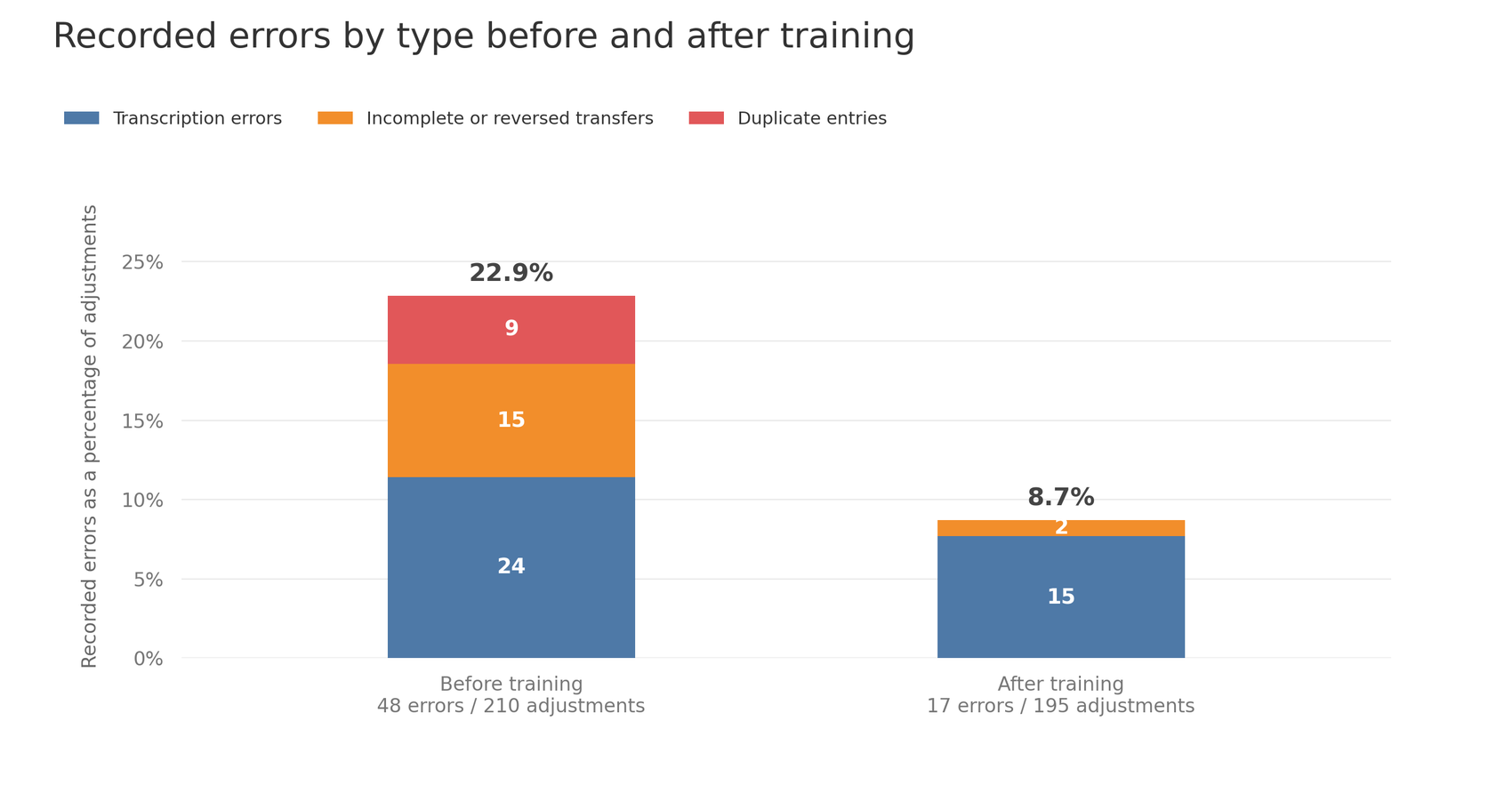
No further duplicate transfer entries were recorded in the follow-up period, and incomplete or reversed transfers became substantially less frequent. Most remaining errors arose from handwritten forms and manual data entry.
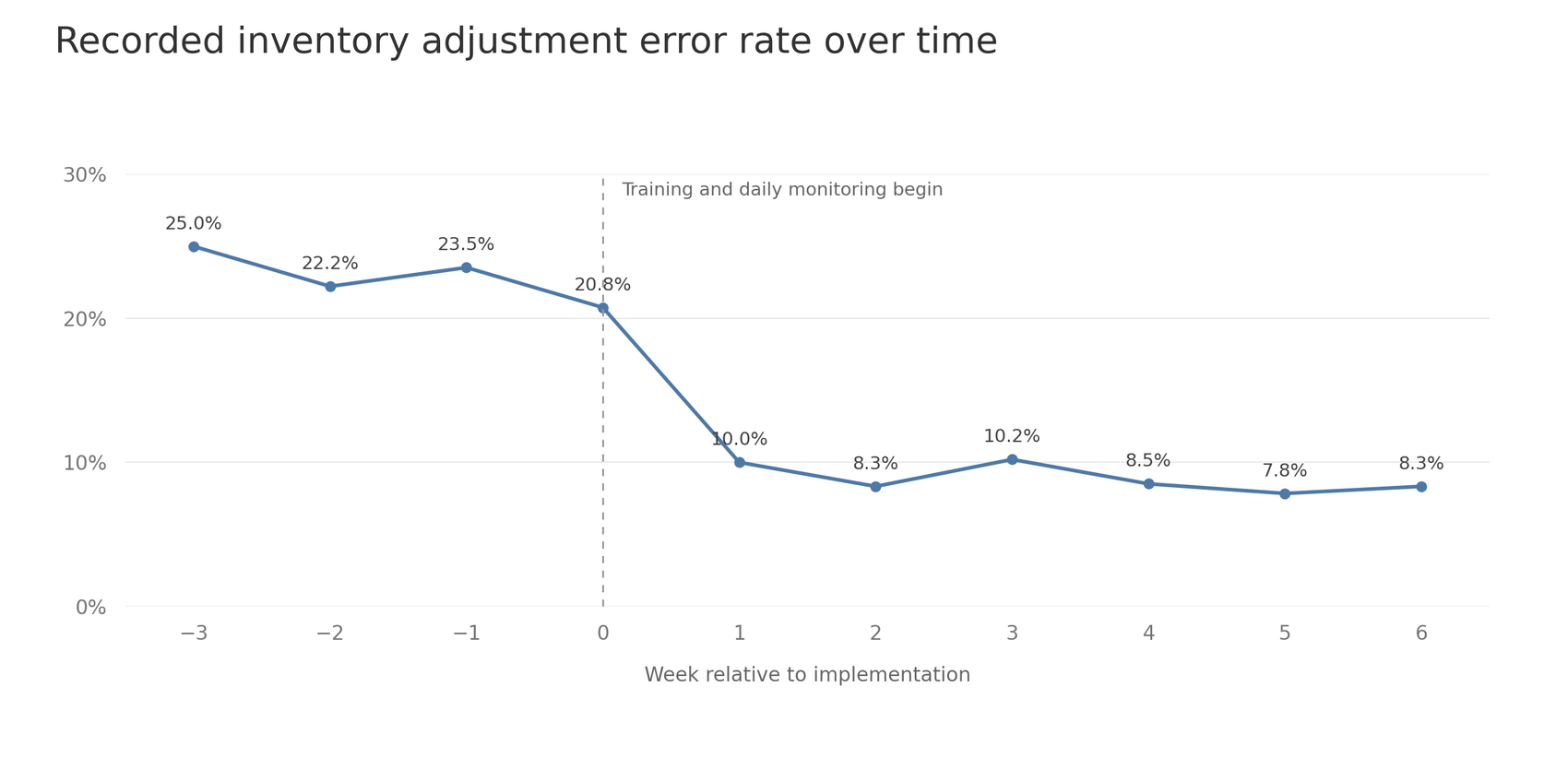
Figure 3 shows the weekly pattern reconstructed for this anonymized account: a sharp decline when training and daily monitoring began, followed by a relatively stable error rate.
Training and daily monitoring began at the same time, so this comparison cannot separate their effects. Employees knew their errors were being logged and discussed each day, which may itself have made them more careful (the Hawthorne effect). The decline most likely reflects training and monitoring together, and I cannot say how much came from either one.
Further considerations
- Estimating financial impact. I did not have access to employee salaries, so I could not calculate labor-cost savings. We estimated approximately twelve staff hours less rework over six weeks, assuming 15 minutes to investigate and correct each recorded error. The 31 fewer recorded errors in the four-week comparison period is about 7.75 per week, or roughly 47 over six weeks.
- Improving the underlying process. Changing the workflow was outside the scope of the project, but the investigation identified opportunities to reduce manual transcription and help employees recognize communications about the same movement. Digitizing inventory forms and linking them to ERP entries would require a separate process-improvement project.
- Handing over ongoing monitoring. I handed the tracking log and supporting materials over to the managers and was no longer involved afterward. Continued monitoring became their responsibility; I therefore cannot report whether the lower error rate persisted beyond the period described here.